

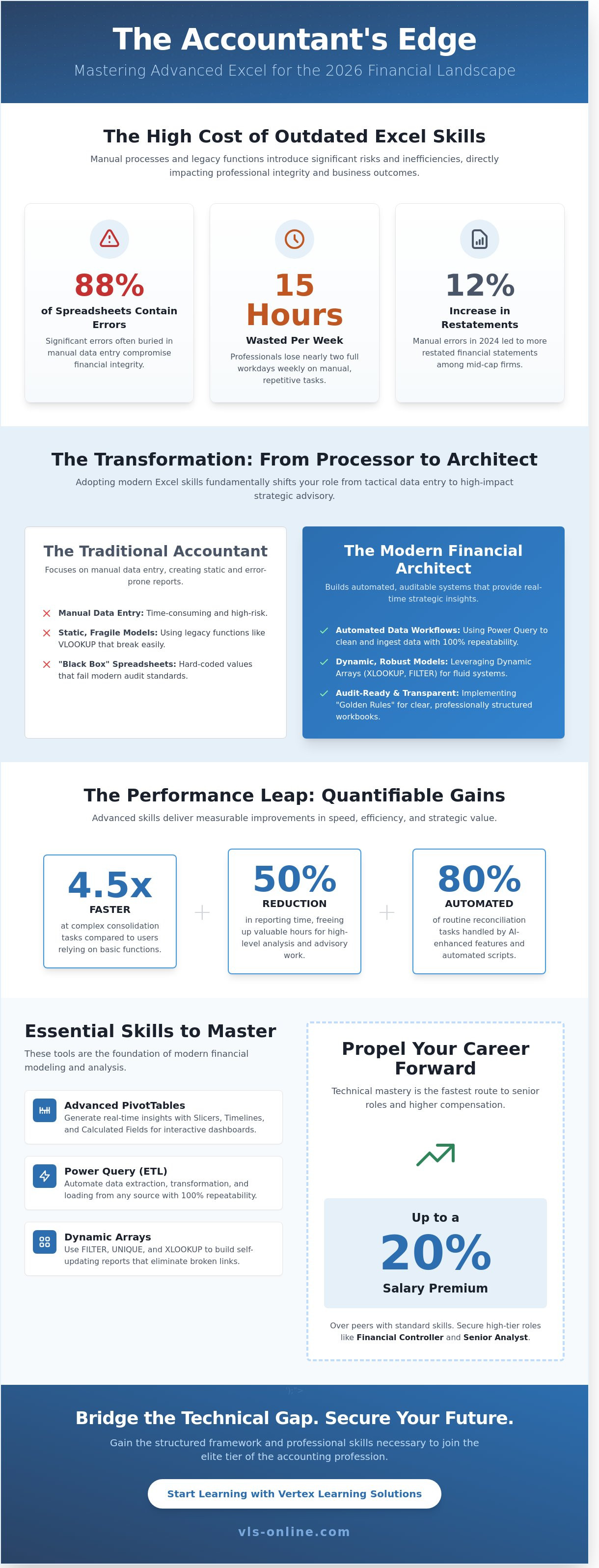
Did you know that 88% of financial spreadsheets contain significant errors, often buried within manual processes that occupy nearly 15 hours of a professional's work week? You likely understand the quiet anxiety of submitting a complex report while fearing that a single broken link might compromise your professional integrity. It's a common challenge to balance the precision required for compliance with the speed needed for modern business decisions.
Mastering Advanced Excel for Accountants shifts your role from a data processor to a strategic architect. By implementing the specific data strategies required for 2026, you can reduce your reporting time by 50% and build audit-ready models that provide absolute clarity. This guide explores the essential automation techniques and structural frameworks that will help you pass professional exams with confidence and secure your reputation as a high-level financial advisor in an increasingly complex environment.
Key Takeaways
- Transition from a data entry mindset to a data architecture approach by leveraging AI-enhanced analysis for more robust financial forecasting.
- Master dynamic arrays and advanced PivotTable features to automate complex reporting schedules and generate real-time strategic insights.
- Implement the "Golden Rules" of financial modeling to ensure your workbooks are transparent, auditable, and professionally structured.
- Discover how proficiency in Advanced Excel for Accountants directly improves performance in high-level certifications like ACCA and the Strategic Business Reporting (SBR) module.
The Strategic Importance of Advanced Excel in 2026 Accounting
By 2026, the definition of professional competence has shifted from simple data entry to robust data architecture. Accountants don't just record transactions; they build the systems that interpret them. The evolution of Microsoft Excel into an AI-enhanced ecosystem means manual calculation is a relic of the past. Modern finance professionals use integrated Copilot features and automated scripts to handle 80% of routine reconciliation tasks, allowing them to focus on high-level advisory work.
Global professional bodies like ACCA and CIMA updated their competency frameworks in 2024 to prioritize digital proficiency as a core pillar. They recognize that technical debt is now a systemic risk for any firm. The efficiency gap is stark; a 2025 industry report found that Advanced Excel for Accountants users complete complex consolidation tasks 4.5 times faster than those relying on basic functions. This isn't just a productivity gain; it's a structural necessity for maintaining a competitive edge in a fast-paced market.
Why Basic Excel is No Longer Enough
Hard-coding values creates "black box" spreadsheets that fail 2026 audit standards. Manual errors in 2024 led to a 12% increase in restated financial statements among mid-cap firms, highlighting the danger of basic workflows. Today's datasets require Power Query to clean millions of rows instantly. Excel remains the "last mile" of financial reporting because it translates raw ERP data into the structured insights required for board-level decision-making.
Excel Skills and Career Progression
Technical mastery is the fastest route to high-tier roles like Financial Controller or Senior Analyst. A Power User accountant acts as a strategic business partner who converts static numbers into predictive models that drive organizational growth. Advanced Excel for Accountants is the primary differentiator in salary negotiations, often resulting in a 20% premium over peers with standard skills. VLS provides the structured framework and professional protection necessary for students to bridge this technical gap and secure their place in the elite tier of the profession.
Essential Advanced Excel Functions Every Accountant Must Master
Proficiency in Advanced Excel for Accountants isn't just about speed; it's about building a defensive architecture for financial data. Since Microsoft introduced dynamic arrays in 2018, the methodology for financial modeling has shifted from static, fragile cells to fluid, self-updating systems. Accountants who rely on legacy methods often face 15% higher error rates in consolidated reporting compared to those utilizing modern logical structures like LAMBDA and SWITCH. These functions allow for the creation of custom, reusable accounting rules that handle complex depreciation or multi-jurisdictional tax calculations without the clutter of traditional nested IF statements.
Advanced PivotTables remain the engine of rapid reporting. By integrating Slicers and Timelines, you provide stakeholders with an interactive dashboard rather than a static table. Calculated Fields allow for the embedding of KPIs directly within the pivot cache, ensuring that margins and variances remain accurate even as the underlying data expands. This level of technical control transforms a standard spreadsheet into a robust audit trail.
Transforming Data with Power Query
Manual data entry is a significant professional liability. Power Query, utilizing the M-language, acts as a professional-grade ETL (Extract, Transform, Load) tool directly within Excel. It automates the ingestion of bank statements and ERP exports with 100% repeatability. The "unpivot" feature is particularly vital. It converts cross-tabulated reports into flat data tables in seconds, ensuring that trial balance preparation remains consistent regardless of the source file's original formatting. This level of precision is a cornerstone of the professional rigor taught in specialized ACCA preparation programs.
Financial Analysis with Dynamic Arrays
The 2020 release of the XLOOKUP function effectively rendered the fragile VLOOKUP obsolete for audit workpapers. XLOOKUP doesn't break when columns are inserted. This provides a robust defensive layer against broken links in complex workbooks. Using FILTER and UNIQUE, practitioners can build a dynamic Trial Balance that adjusts instantly as new transactions enter the ledger. These self-sorting lists eliminate the need for manual refreshes. It allows management accounts to reflect real-time financial positions. This structural approach to Advanced Excel for Accountants ensures every report is both logically sound and strategically actionable.
Building Audit-Ready Financial Models and Automating Workflows
Professional financial reporting requires more than basic arithmetic; it demands a structural integrity that withstands the scrutiny of internal and external auditors. Mastering Advanced Excel for Accountants involves adhering to the "Separation of Concerns" principle. This methodology isolates raw inputs from logical calculations and final presentation outputs. By doing so, you ensure that a single change in an assumption doesn't break the entire workbook. Transparency is equally vital. Using Named Ranges instead of obscure cell references like "B42" transforms a formula into a readable sentence, while strategic cell comments provide the necessary narrative for complex tax adjustments.
To safeguard these models, error trapping is non-negotiable. Implementing IFERROR functions prevents "DIV/0" errors from cascading through a consolidated report, while Data Validation rules restrict input ranges to prevent catastrophic data entry mistakes. These safeguards act as a professional safety net, ensuring that the model remains functional even when handled by multiple stakeholders.
The Anatomy of a Professional Financial Model
A modular design allows any colleague to step in and understand the logic without a three-hour handover. The most critical component of this structure is the "Check Figure" sheet. These formulas verify balance sheet integrity by ensuring that assets always equal liabilities plus equity. For those looking to build this foundational knowledge, the ACCA Applied Skills curriculum provides the necessary context for applying these technical skills within a global regulatory framework.
From Macros to Office Scripts
As we approach 2026, the distinction between VBA and Office Scripts becomes a strategic choice for the modern practitioner. While VBA remains the powerhouse for desktop-based automation, Office Scripts offer the web-friendly flexibility required for cloud-based collaboration in Microsoft 365. Automating the "Month-End" close can reduce manual data processing time by up to 85%, allowing the finance team to focus on variance analysis rather than repetitive data entry. This level of automation significantly mitigates the risk of human error during high-pressure reporting cycles where a single misplaced decimal point can lead to material misstatements.
Secure your professional future by exploring our specialized ACCA preparation courses to master these technical requirements and regulatory standards.
Bridging the Gap: Integrating Excel Skills with Professional Certifications
Professional certification success often hinges on technical execution rather than just theoretical knowledge. In the ACCA and CIMA computer-based exam (CBE) environments, the spreadsheet tool isn't merely a digital scratchpad; it's a fundamental component of the assessment criteria. Candidates who demonstrate Advanced Excel for Accountants within these platforms often secure higher marks by automating complex schedules and reducing the risk of manual calculation errors. This technical proficiency allows for more time to be spent on high-value analysis and strategic recommendations.
Within the Strategic Business Reporting (SBR) module, examiners look for the ability to structure group financial statements and handle complex consolidation adjustments efficiently. Similarly, applying Excel logic to the Diploma in IFRS (DipIFR) allows candidates to manage intricate lease calculations or deferred tax schedules with precision. Evidence suggests that students who master these digital tools can improve their exam time management by up to 20%, providing a significant advantage in high-pressure environments.
Excel in ACCA Strategic Professional Exams
The spreadsheet environment in professional exams requires a specific tactical approach that goes beyond basic data entry. In Advanced Financial Management (AFM), calculating Net Present Value (NPV) and Internal Rate of Return (IRR) through built-in functions is essential for accuracy. It's about the methodology and the logical flow of the data. This technical foundation is a prerequisite for Mastering the Diploma in IFRS and other high-level qualifications that demand rigorous analytical standards.
Taking the Next Step with VLS
Vertex Learning Solutions recognizes that technical mastery is the safety net every modern professional needs. Our Advanced Excel for Accountants course is integrated into our curriculum to bridge the gap between academic theory and workplace reality. We provide direct tutor support via WhatsApp, ensuring that students can resolve real-world Excel hurdles or exam-specific technical queries in real-time. This proactive approach ensures your skills remain sharp in an evolving regulatory landscape. Explore our Full Access Packages and Excel courses to build a secure professional future.
Securing Your Strategic Advantage in 2026
The financial landscape of 2026 demands a shift from reactive data entry to proactive data strategy. Mastering Advanced Excel for Accountants allows you to build the structural safeguards necessary for complex tax compliance and risk management. Industry data from the 2024 Future of Finance report shows that 75% of elite accounting firms now utilize automated workflows to eliminate manual errors. By adopting these methodologies, you provide the professional protection and precision that modern organizations require. It's no longer enough to manage data; you must optimize it through logical, audit-ready frameworks.
Your professional growth depends on the integration of these technical skills with globally recognized certifications. Vertex Learning Solutions offers a specialized environment to refine your expertise and achieve your career milestones. Our students access global tutor support via WhatsApp, receive exam-focused study notes, and participate in weekly live interactive sessions. This structured approach ensures you're never navigating the complexities of the ACCA syllabus alone. It's a proven path to securing your position as a strategic partner in any financial department.
Master Advanced Excel and pass your ACCA exams with Vertex Learning Solutions. Take the next step toward a stable and elite professional future today.
Frequently Asked Questions
Is Advanced Excel still relevant for accountants in the age of AI?
Excel remains the definitive tool for financial validation and strategic oversight. The 2023 Gartner Finance survey confirms that 82% of finance leaders still view spreadsheet proficiency as a core competency despite AI adoption. You'll need these skills to audit AI-generated outputs and build bespoke risk management models. It ensures your professional judgment isn't replaced by a black-box algorithm.
What is the most important Excel function for an accountant to learn first?
XLOOKUP is the most critical function for modern reconciliation and data integrity. Since its 2019 release, it has streamlined how professionals merge disparate ledgers without the structural risks of older formulas. Mastering this tool is a prerequisite for anyone pursuing Advanced Excel for Accountants. It allows you to link thousands of data points across multiple workbooks with absolute precision and zero manual errors.
How long does it take to master Advanced Excel for accounting?
Professional mastery typically requires 40 to 60 hours of dedicated technical training. Most accountants reach a strategic level of proficiency within 90 days by integrating complex formulas into their monthly closing procedures. This timeline focuses on moving beyond simple data entry toward automated reporting and advanced financial modeling. It's a structured approach that builds the technical shield necessary for high-stakes financial environments.
Can I use Advanced Excel skills in my ACCA or CIMA exams?
You'll apply these techniques directly within the Spreadsheet environment of ACCA and CIMA Computer Based Exams. Since the 2018 shift to digital testing, candidates who use efficient formulas often finish their calculations 15% faster than those using manual methods. Precise cell referencing and logical functions aren't just for show; they're essential for passing the strategic professional levels. High-level Excel skills translate into higher exam scores and better time management.
What is the difference between Excel for general business and Excel for accountants?
The distinction lies in the rigorous requirements for auditability and regulatory compliance. While general users focus on basic visualization, Advanced Excel for Accountants prioritizes the creation of transparent, error-proof financial models. You're building a secure infrastructure for data that must withstand 100% scrutiny from auditors and tax authorities. This specialized focus ensures that every calculation is traceable, repeatable, and legally sound.